Start free

Pull the data you need out of any document. Every value shows where it came from.

Send an invoice, a receipt or a bank statement as a PDF, a scan or a phone photo. Takarda AI reads it, draws a box round every value on the page, and flags anything that does not add up before you download it.

Your workspace

This is where you work. See it before you sign up.

Six screens from the real workspace, with receipts that Takarda read. Pick a tab, and click a screen to see it full size.

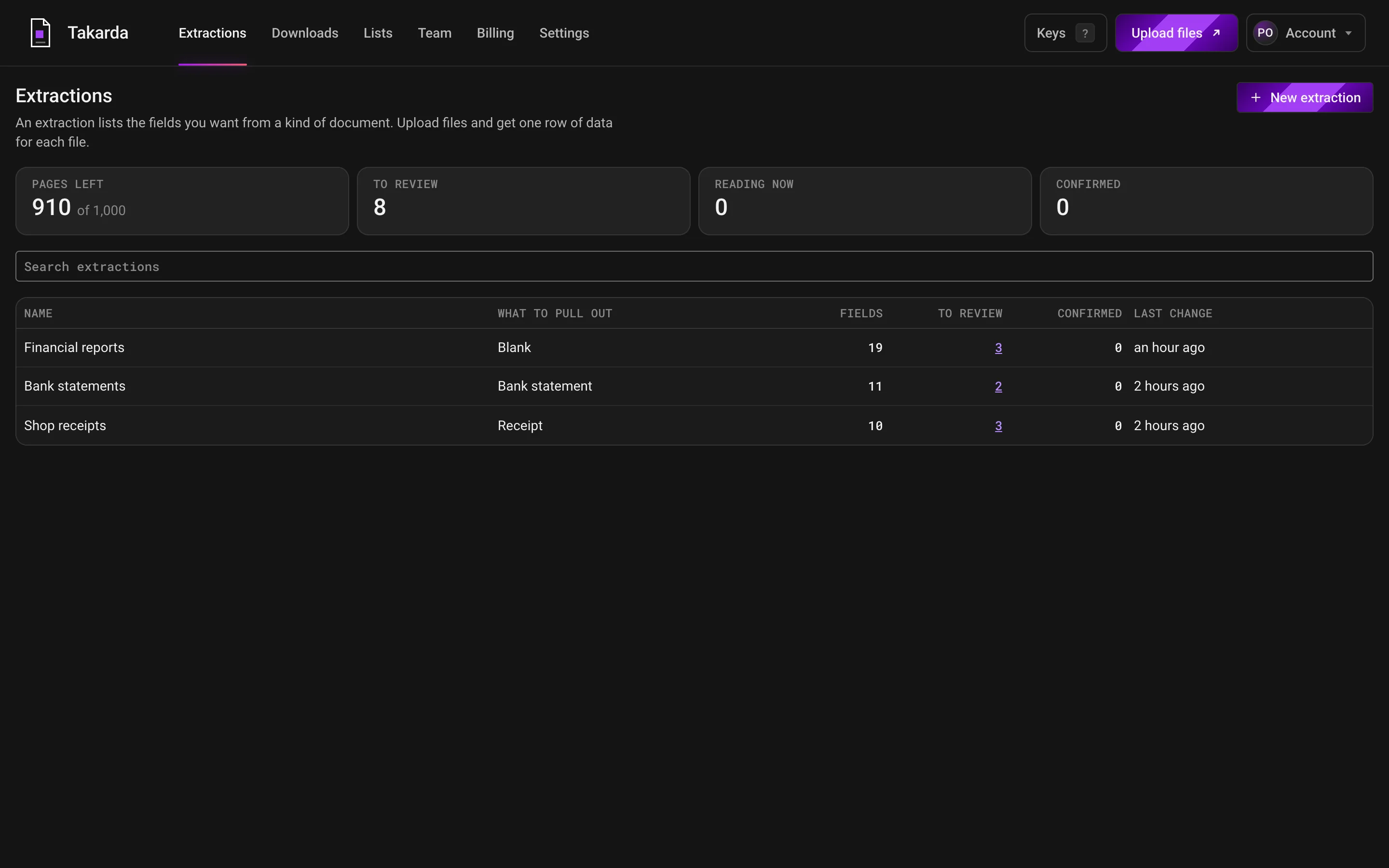
Takarda's list of work: pages left, files to look at, files being read and files confirmed, with three lists named Financial reports, Bank statements and Shop receipts.

Each list you have made shows its files, how many are waiting for a look and how many are confirmed.

The count at the top shows the pages you have left this month.

Read your own files after you sign up: the free plan reads 30 pages a month.

Documents and formats Takarda reads

  • Invoices
  • Receipts
  • Purchase orders
  • Bank statements
  • CVs
  • Contracts
  • Bills of lading
  • Business cards
  • PDF
  • Phone photo
  • Scan
  • Word
  • WhatsApp forward
  • Email attachment
  • Plain text

Counted on real documents

87 pages read: two real bank statements and a public quarterly report. Each figure is counted against an answer key and says what it counts.

  • On two bank statements

    983 of 983

    Transactions found

    On two real bank statements, 48 pages together. None missed, none invented.

    100% counted

  • On two bank statements

    1,966 of 1,966

    Amounts and balances right

    Every printed amount and every running balance. On one statement 92 amounts kept their printed minus sign.

    100% counted

  • On two bank statements

    1,358 of 1,365

    Boxes in the right place

    When Takarda drew a box it sat on the right value, but it drew one for only 1,365 of 3,932 values.

    99.5% counted

  • On a public report

    19 of 19

    Report fields right

    A public quarterly report of a listed Nigerian bank, 37 pages, each field shown with its box, in 1 minute 42 seconds.

    100% counted

These are the figures of the version tested. Changes made since have not been measured again. What went wrong is listed on each document below, not left out.

Documents arrive. Data leaves. You check it in between.

Documents come from everywhere.

Customers email PDFs, suppliers send photos on WhatsApp, branches hand in paper, and banks send statements from an app. Upload them as they come, one file or a whole folder.

Data leaves when you say so.

Takarda reads each file, checks the sums and the missing values, and shows the page beside every value. You confirm it, then download Excel, CSV or JSON.

Field lists

Say what to pull out, in plain words.

Pick a ready field list for invoices, receipts, bank statements and more, or start blank. Each field is a name, a sentence saying what to look for, and a typical value.

Describe it once. Read it on every file.

Write the field name, what to look for, and a typical value, as you would explain it to a new colleague. Takarda uses the same field list on every file, so each one comes back in the same columns.

No training needed. There are no files to label. If a value comes back empty, reword the sentence and read the file again.

See the ready field lists

Every value. Its box on the page.

Click a value and its box lights up on the page, so you can check it in a second instead of hunting for it.

Nothing is filled in to look complete. If the page does not show a value, it says Not on the page and stays empty, and a required value that is missing raises a warning.

How the boxes are drawn

See it work

Four steps, on real screens. Scroll through them.

These are screens of Takarda as it runs, taken while reading real documents. Use the list to jump to a step, or just scroll.

1Step 1 of 4

Define what to pull out

Pick the ready list nearest your document, or start blank, then name each value you want. Every field has a plain description and a kind, such as text, a date or an amount in naira.
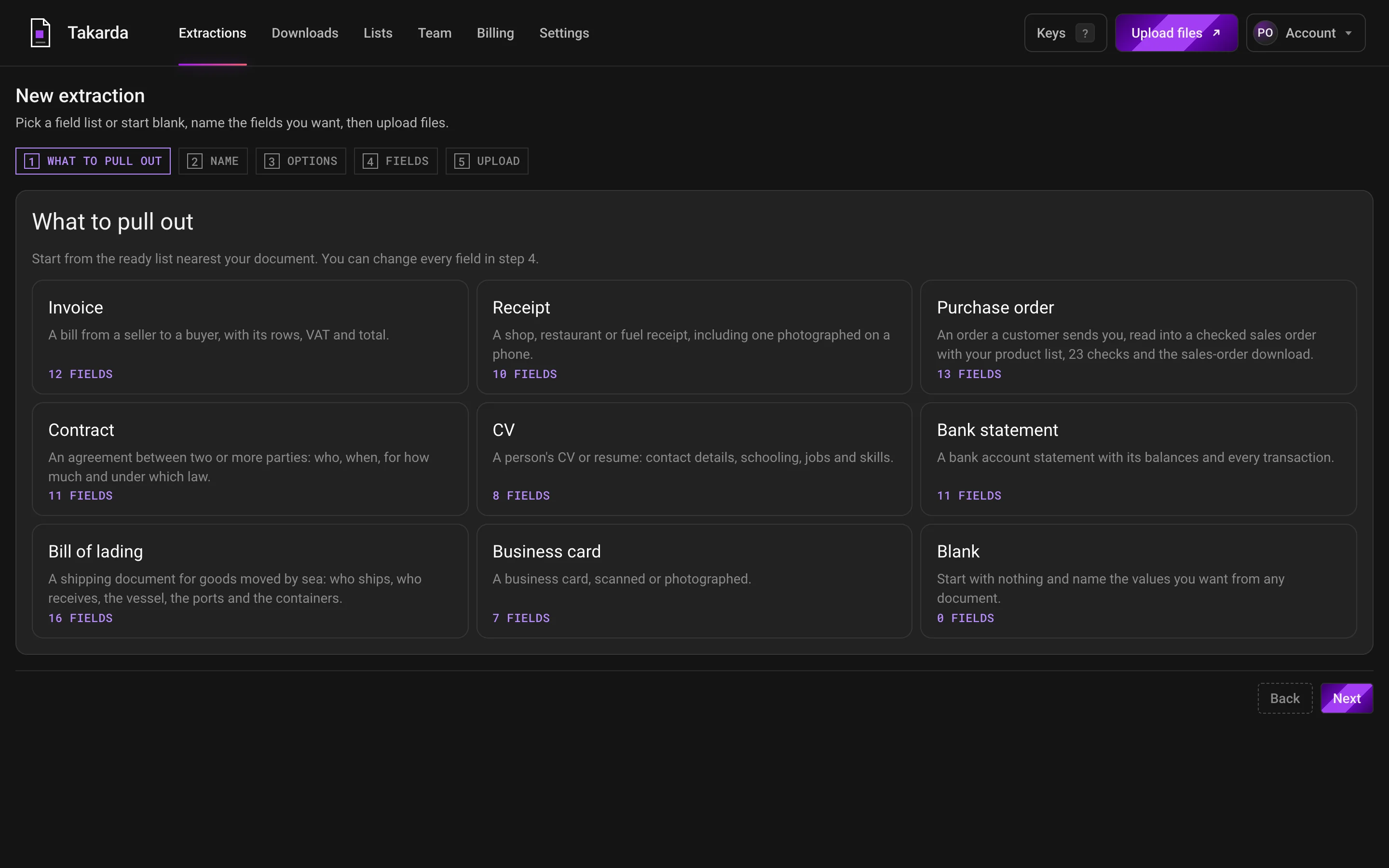
Takarda's first screen: eight ready lists, from invoice and receipt to bank statement and bill of lading, and a blank list, each showing its number of fields.
Eight ready lists and a blank one. You can change every field afterwards.Full size (opens the screen in a new tab)
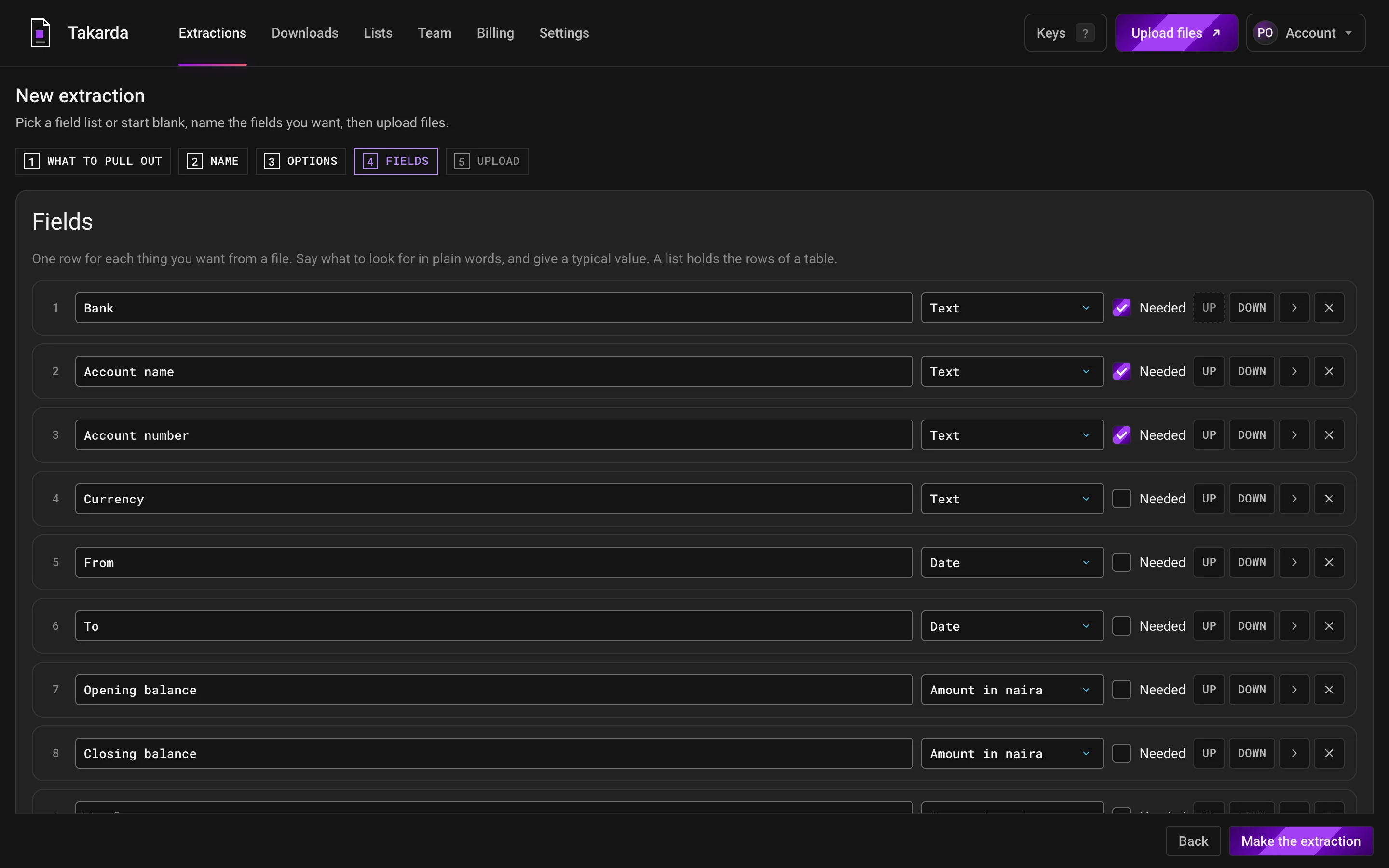
The bank statement list opened for editing: one row for each value, such as bank, account name, opening balance and closing balance, each with a kind and a Needed switch.
The bank statement list: one row for each value, with its kind and a Needed switch.Full size (opens the screen in a new tab)

Measured: fields on a public report

  • 19 of 19 fields righton a public report, read with a list of 19 fields written for it
2Step 2 of 4

Upload

Add PDFs or phone photos to a list. Each file becomes one row of data, and the list keeps count of the files waiting for a look and the pages you have left.

Takarda's list of work: three lists named Financial reports, Bank statements and Shop receipts, with the number of files waiting to be looked at and a count of pages left.
Three lists with their files: 8 files waiting for a look and 910 of 1,000 pages left.Full size (opens the screen in a new tab)

Measured: reading time

  • 37 pages1 minute 42 seconds, upload to ready
  • 12 pages2 minutes 51 seconds of reading
  • 36 pages14 minutes 8 seconds, upload to ready

3Step 3 of 4

Check each value beside its box

Click a value and its box lights up on the page. A value the page does not show says Not on the page, and nothing is filled in to look complete. Warnings stay in view, and a person confirms each file.

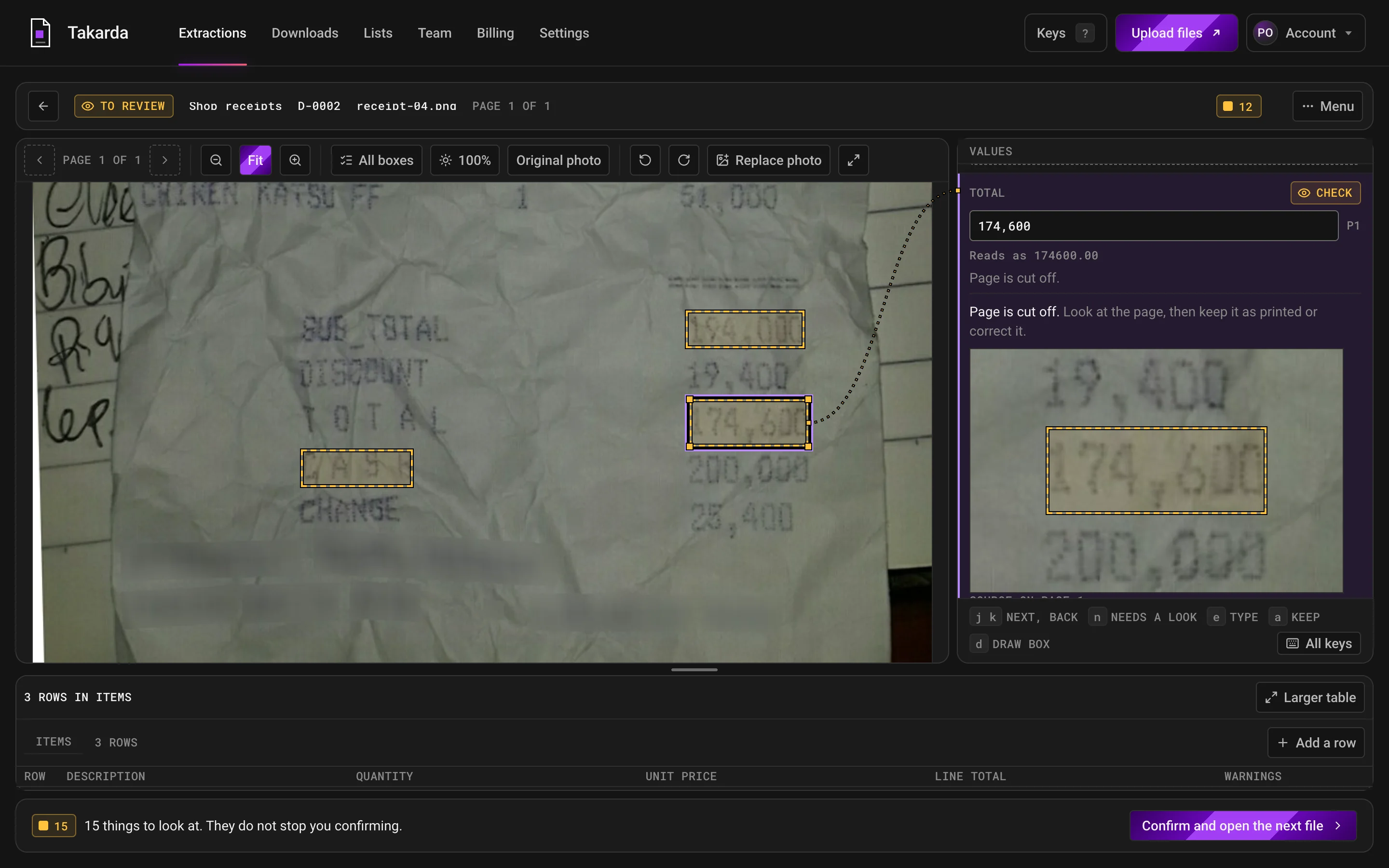
A crumpled receipt photo with yellow boxes round three amounts. The total, 174,600, is selected, a dotted line joins its box to the value on the right, and a Check mark says the page is cut off.
The total, 174,600, beside its box on a crumpled receipt photo. Takarda marks it Check because the page is cut off.Full size (opens the screen in a new tab)
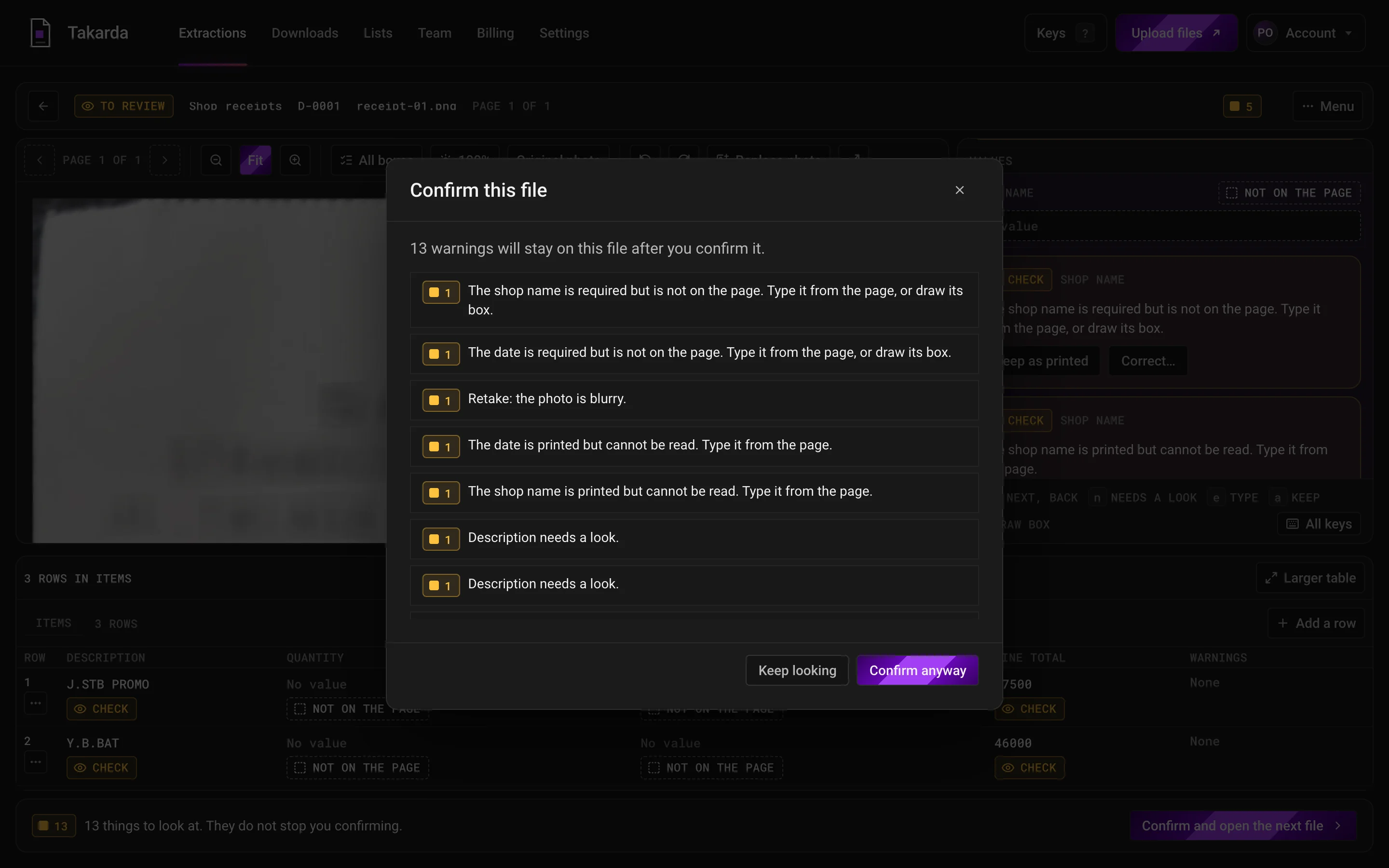
A window titled Confirm this file listing 13 warnings, such as a shop name that is not on the page and a photo that is blurry, with the buttons Keep looking and Confirm anyway.
A blurry photo with 13 warnings. Takarda lists every one before the file is confirmed, and they stay on the file.Full size (opens the screen in a new tab)

Measured: boxes

  • 1,358 of 1,365boxes in the right place on the two statements
  • 1,365 of 3,932statement values had a box at all

4Step 4 of 4

Download

One row for each file, with a mark on every value: on the page, not on the page, check, doesn't match, corrected or confirmed. When a person has confirmed the files, download them as Excel, CSV or JSON.

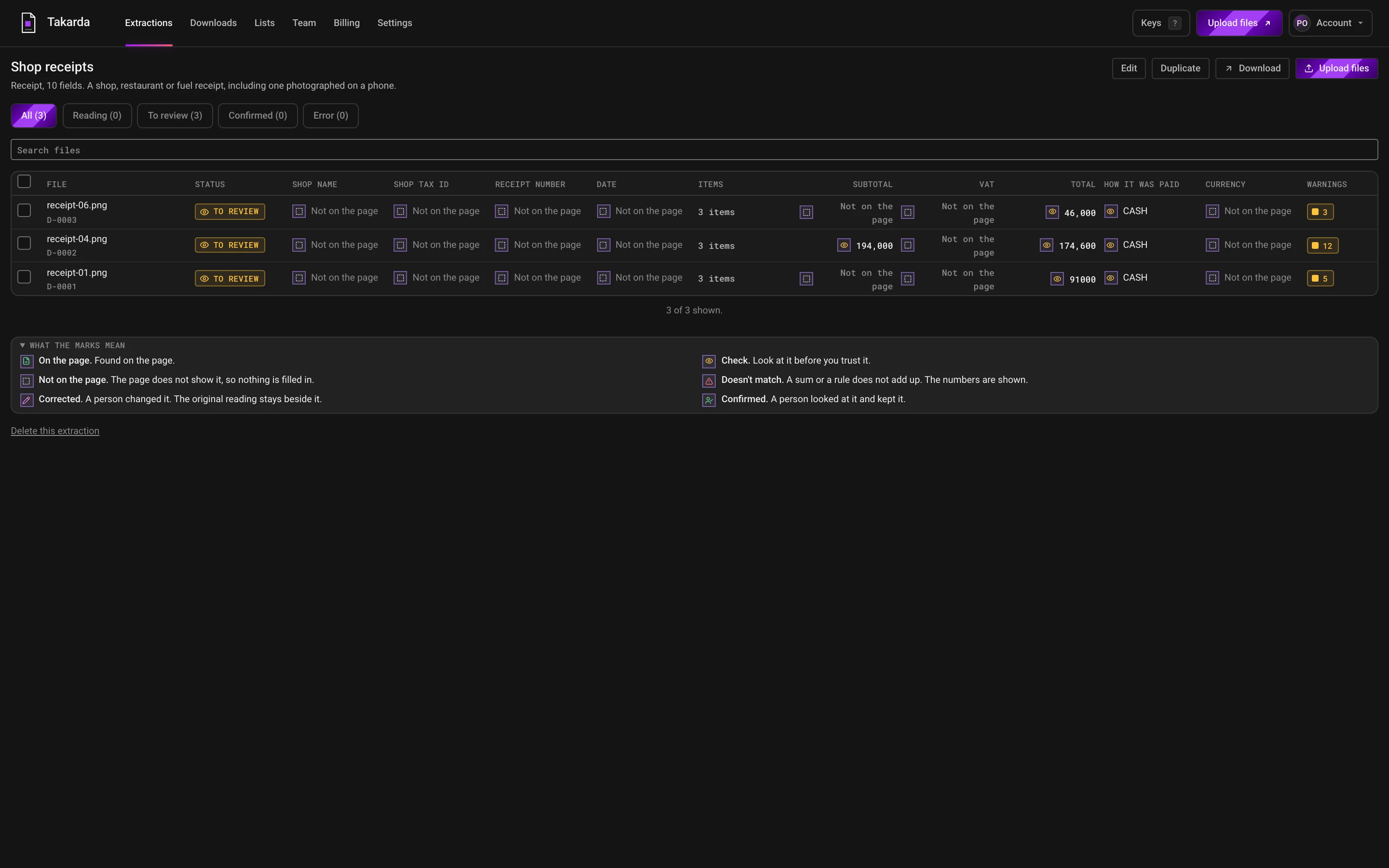
A table of three receipt photos, one row each. Most values read Not on the page, with a small mark for each state and a key to the marks underneath.
Three receipt photos, one row each. Most values here say Not on the page, and the table shows it rather than guess.Full size (opens the screen in a new tab)
A Download window offering Excel, CSV or JSON, with a choice of how to show lists and a Download button.
Excel, CSV or JSON. Every confirmed file not yet downloaded goes in one download.Full size (opens the screen in a new tab)
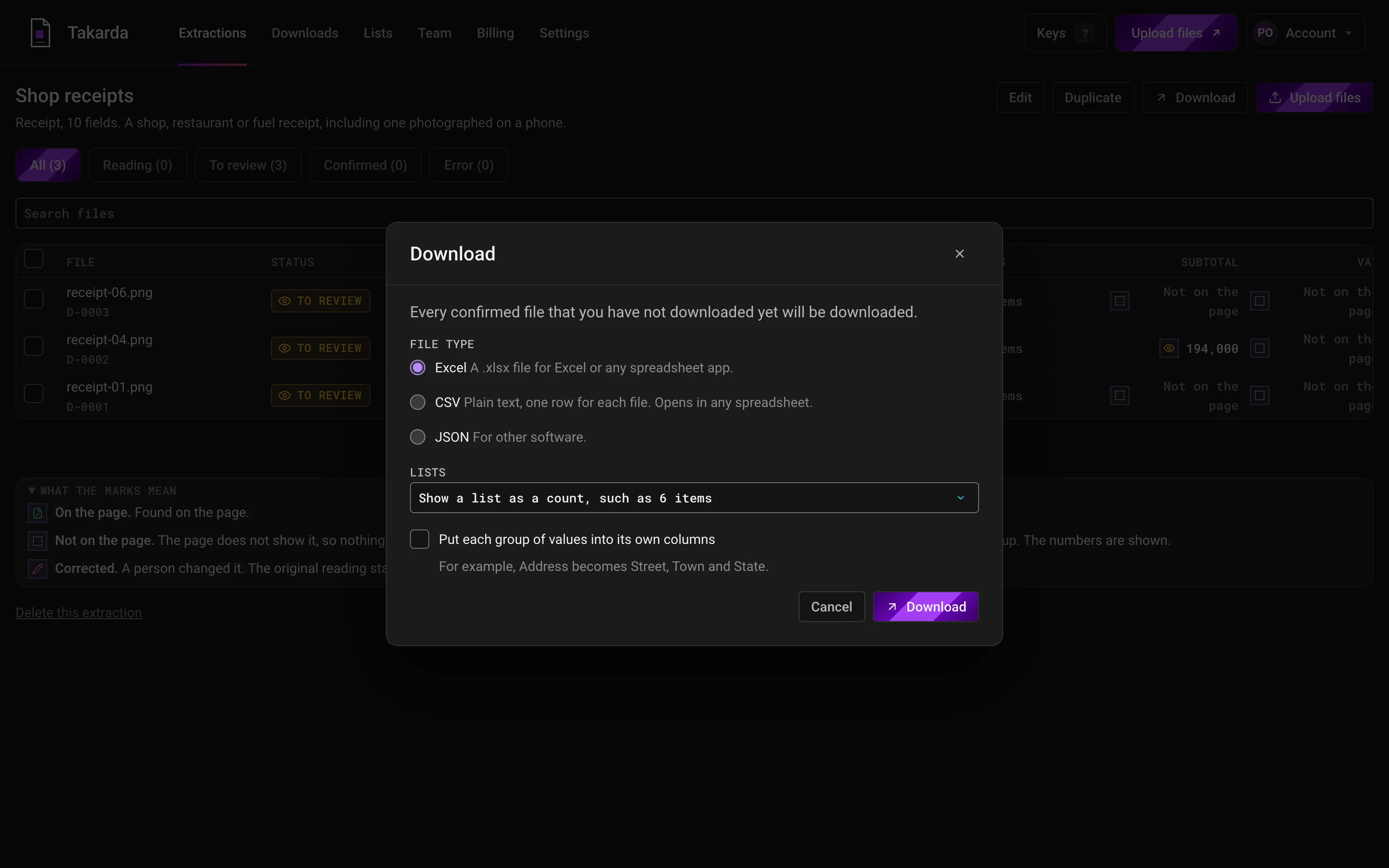
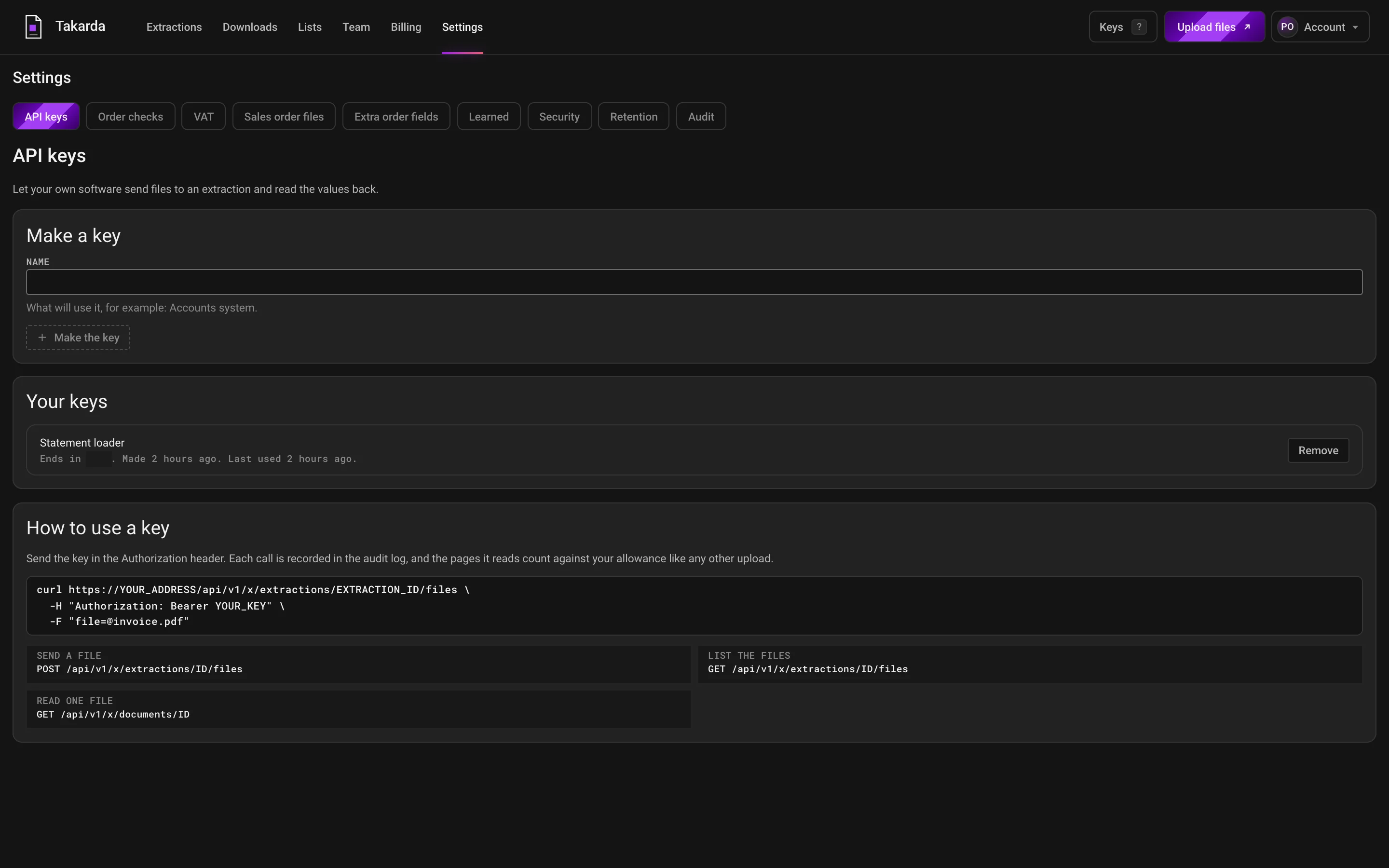
The settings page for connecting your own software: a place to make a key, the list of keys, and a short example of sending a file.
Your own software can do the same: make a key, then send files with the three calls shown.Full size (opens the screen in a new tab)

Measured: cost to read

  • ₦17537 pages, about $0.11
  • ₦29312 pages, about $0.18
  • ₦1,76836 pages, about $1.11

Naira at ₦1,600 to the dollar.

Receipt photos on these screens are from the public CORD v2 set by NAVER Clova, licence CC BY 4.0.

What you can count on

Any file in. Checked rows out.

Three things hold for every document you upload, whatever its type.

Who uses Takarda

Businesses that live on paperwork.

Any business that receives documents from customers, suppliers or clients and types them into a spreadsheet or accounting software.

Distributors and wholesalers

Each customer's order as rows of product, quantity and price, matched to your own product list.

A woman with a clipboard of purchase orders in a warehouse of stacked cartons
18fields read from every purchase order12 fields, plus 6 columns in the items list

Tested on real documents

Real documents, real counts. What went wrong is shown too.

Takarda read two real bank statements and a public quarterly report. Every figure is counted against an answer key taken from the document's own text and checked row by row by two people. These are the figures of the version tested.

  • Bank statement · 36 pages · 819 rows

    A fintech wallet statement

    Two months, two accounts in one file (a wallet and a savings account), phone-bank PDF

    Counted

    • Transactions found819 of 819 100%

      None missed, none invented.

    • Amounts exact to the kobo819 of 819 100%

      Money in or money out, to the kobo.

    • Running balances exact819 of 819 100%
    • Money in and money out mixed up0 of 819 0%

      Lower is better; zero is the right answer.

    • Dates on the right day818 of 819 99.9%
    • Descriptions word for word781 of 819 95.4%

      28 of the 38 misses differ only in spacing; 6 lost the first line where the row starts at the bottom of a page; 4 have misread characters.

    • Summary values right10 of 10 100%
    • Boxes in the right place, of those drawn1,064 of 1,071 99.3%
    • Values that had a box1,071 of 3,276 32.7%

      Weak spot

      A weakness of the version tested: most right values had no box and said Not on the page.

    Time
    14 minutes 8 seconds, upload to ready
    Cost to read
    ₦1,768, about $1.11 (about ₦49 a page)

    What went wrong

    • Only 1,071 of 3,276 values had their box on the page; the rest were right but said Not on the page.
    • The file holds two accounts and the field list expected one, so the money in and money out totals were marked Doesn't match although every amount was right.
    • 238 dates printed with a time of day were read on the right day but not recognised as dates.
    • 24 of 66 reading calls ran out of room on dense pages; a third of the cost was spent on answers that were thrown away and read again.
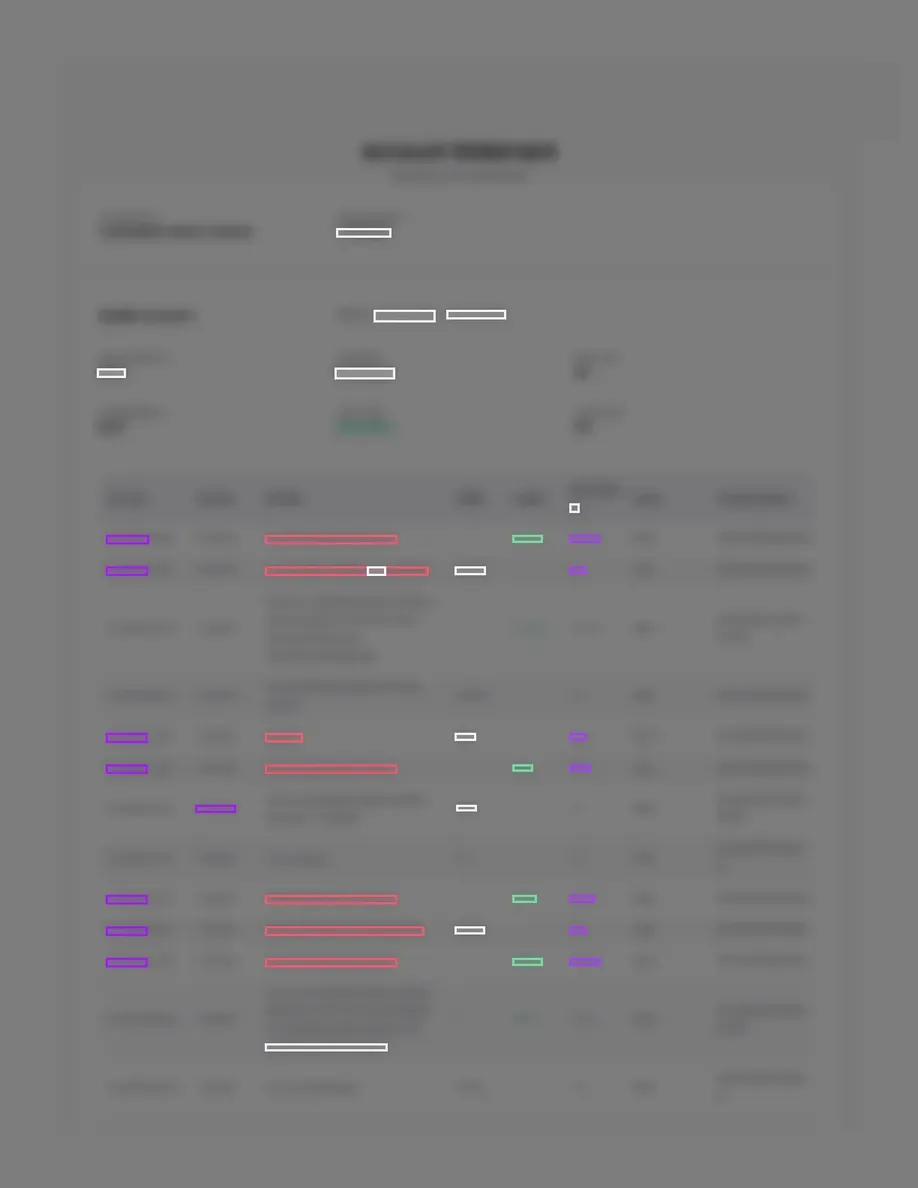
    Page 1 of a statement, every character blurred, with coloured boxes where Takarda found each valuepage 1 of 36
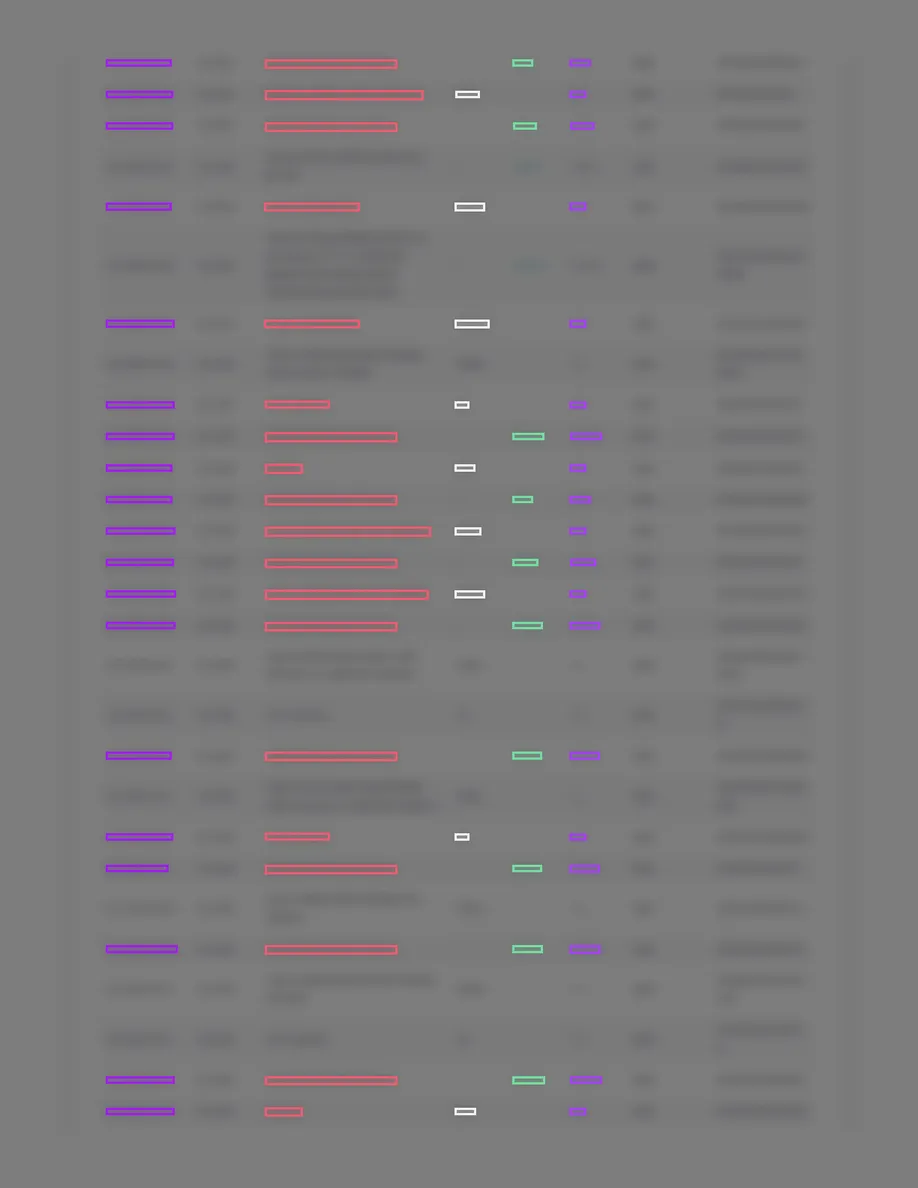
    Page 22 of a statement, every character blurred, with rows of coloured boxes where Takarda found each valuepage 22 of 36
    Every character is blurred on purpose, and the top edge is cropped out. The coloured boxes are where Takarda found each value.
  • Bank statement · 12 pages · 164 rows

    A naira account statement from a payments app

    Nine months, newest first, one signed amount column, phone-bank PDF

    Counted

    • Transactions found164 of 164 100%

      None missed, none invented.

    • Amounts the right size164 of 164 100%

      92 money-out amounts were stored with their printed minus sign.

    • Running balances exact164 of 164 100%
    • Dates on the right day164 of 164 100%
    • Descriptions word for word163 of 164 99.4%
    • Summary values right10 of 10 100%
    • Boxes in the right place, of those drawn294 of 294 100%
    • Values that had a box294 of 656 44.8%

      Weak spot

    Time
    2 minutes 51 seconds, of reading
    Cost to read
    ₦293, about $0.18 (about ₦24 a page)

    What went wrong

    • 92 money-out amounts kept the minus sign the statement prints, so a download would show them as negative numbers.
    • 362 right values had no box and said Not on the page.
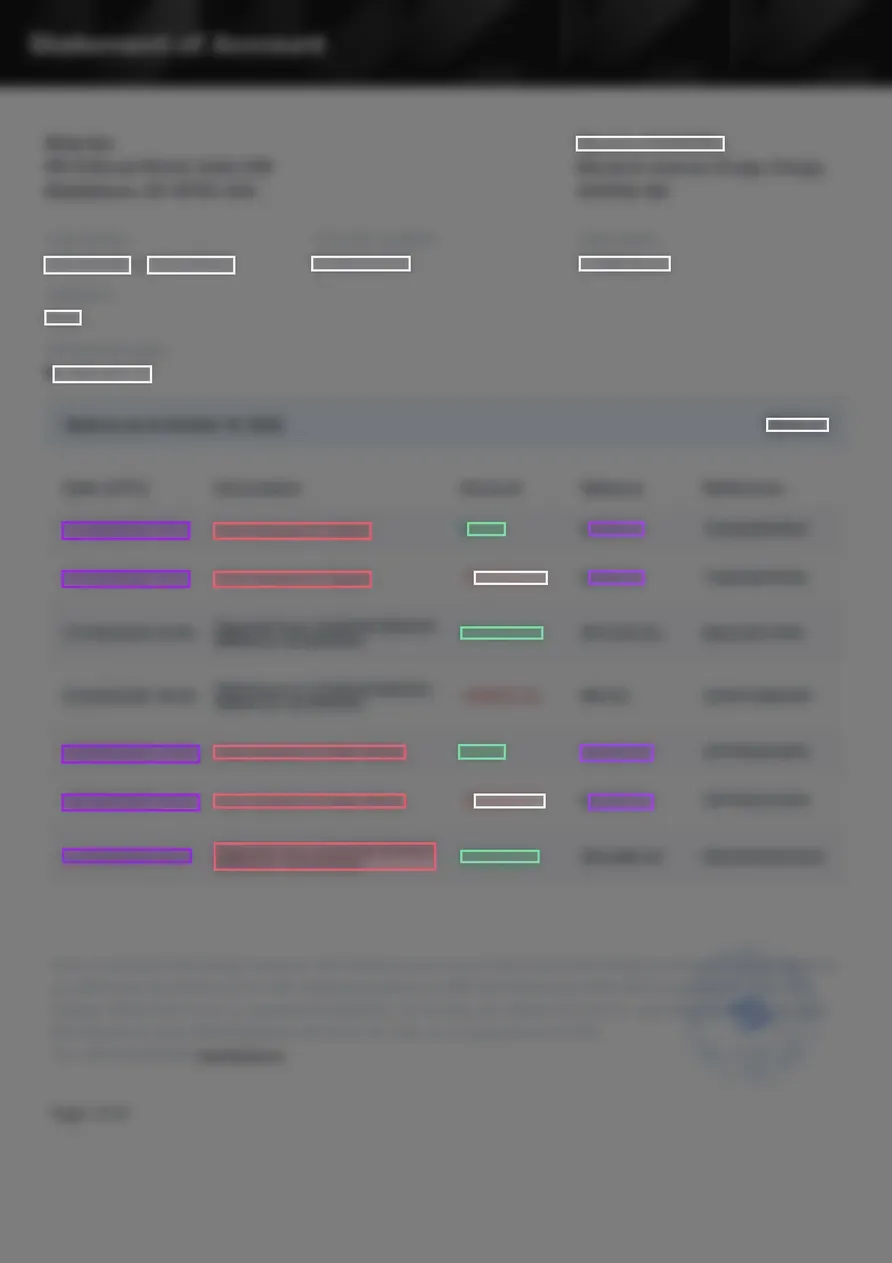
    Page 1 of a statement, every character blurred, with coloured boxes where Takarda found each valuepage 1 of 12
    Every character is blurred on purpose, and the top edge is cropped out. The coloured boxes are where Takarda found each value.
  • Company report · 37 pages · 19 fields

    A public quarterly report of a listed Nigerian bank

    Interim consolidated accounts, 37 pages, amounts in millions of naira; read with a field list of 19 fields written for it (no ready list)

    Counted

    • Fields right19 of 19 100%
    • Fields shown with a box19 of 19 100%
    • A check that passed: total liabilities plus total equity equals total assets.

    Time
    1 minute 42 seconds, upload to ready
    Cost to read
    ₦175, about $0.11 (about ₦5 a page)

    What went wrong

    Nothing was wrong on this report in the test. One report with 19 fields is a small test, so it says little about other reports.

    Each square is one field of the 19, right and shown with its box.

    Read from a picture of one page

    • The income statement page, page 2 of 3712 of 12 values on the page right7 of 7 absent fields said Not on the page
    • The balance sheet page, page 3 of 3710 of 10 values on the page right9 of 9 absent fields said Not on the page
  • Shop receipts · 2 pages · 10 rows

    Two shop receipts photographed on a phone

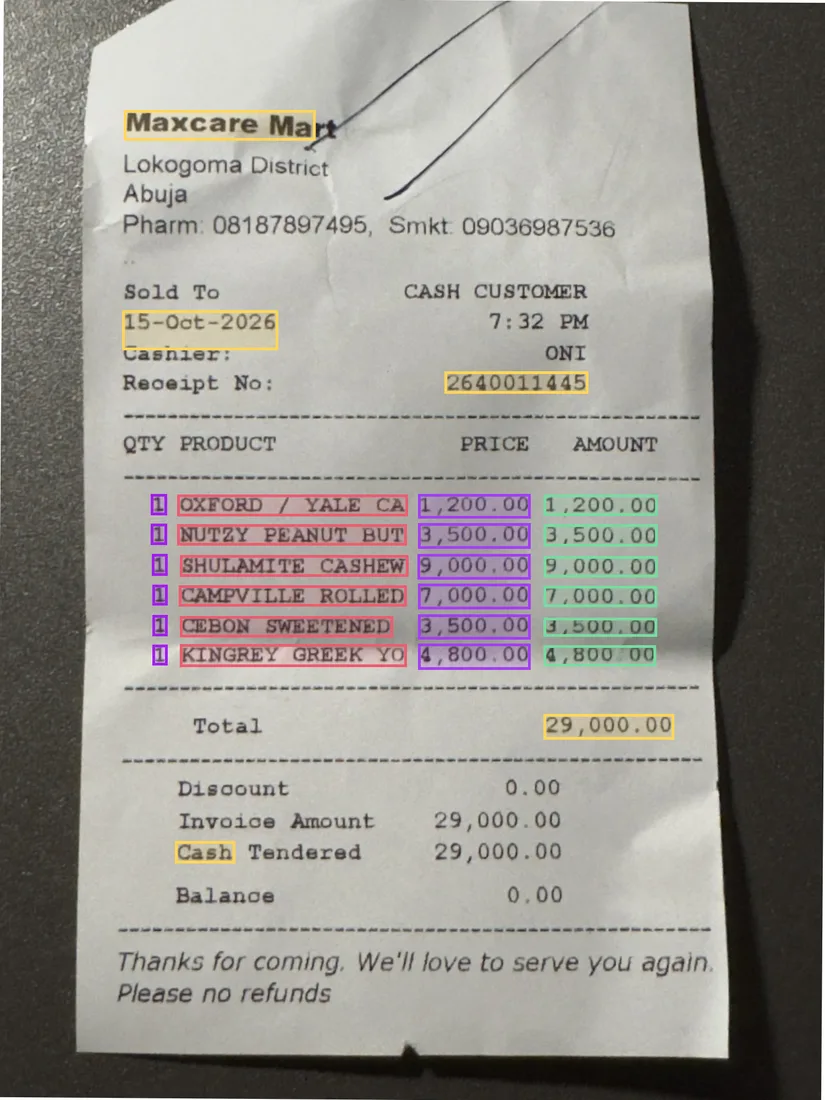
    A supermarket and a body care shop in Abuja: thermal paper with pen marks across the shop names, creases and shadows, taken with an iPhone

    Counted

    • Printed values right10 of 10 100%

      Shop, receipt number, date, total and how it was paid, on each receipt.

    • Not printed, said Not on the page8 of 8 100%

      Tax ID, subtotal, VAT and currency, which neither receipt prints.

    • Item rows found10 of 10 100%

      None missed, none invented.

    • Item cells exact40 of 40 100%

      Quantity, item, unit price and amount on every row.

    • Values that had a box50 of 50 100%
    Time
    20 seconds, upload to ready
    Cost to read
    ₦28, about $0.02 (about ₦14 a page)

    What went wrong

    • Every value was marked Check rather than On the page: Takarda is more careful with photos than with PDFs, so a person looks at each one before confirming.
    • Both receipts got a "Retake: the photo is cut off at the edge" warning although the whole receipt was in the photo. The paper sat close to the edges of the picture.
    A shop receipt photographed on a phone: Maxcare Mart, 6 items, total ₦29,000.00, with a coloured box on every value Takarda read
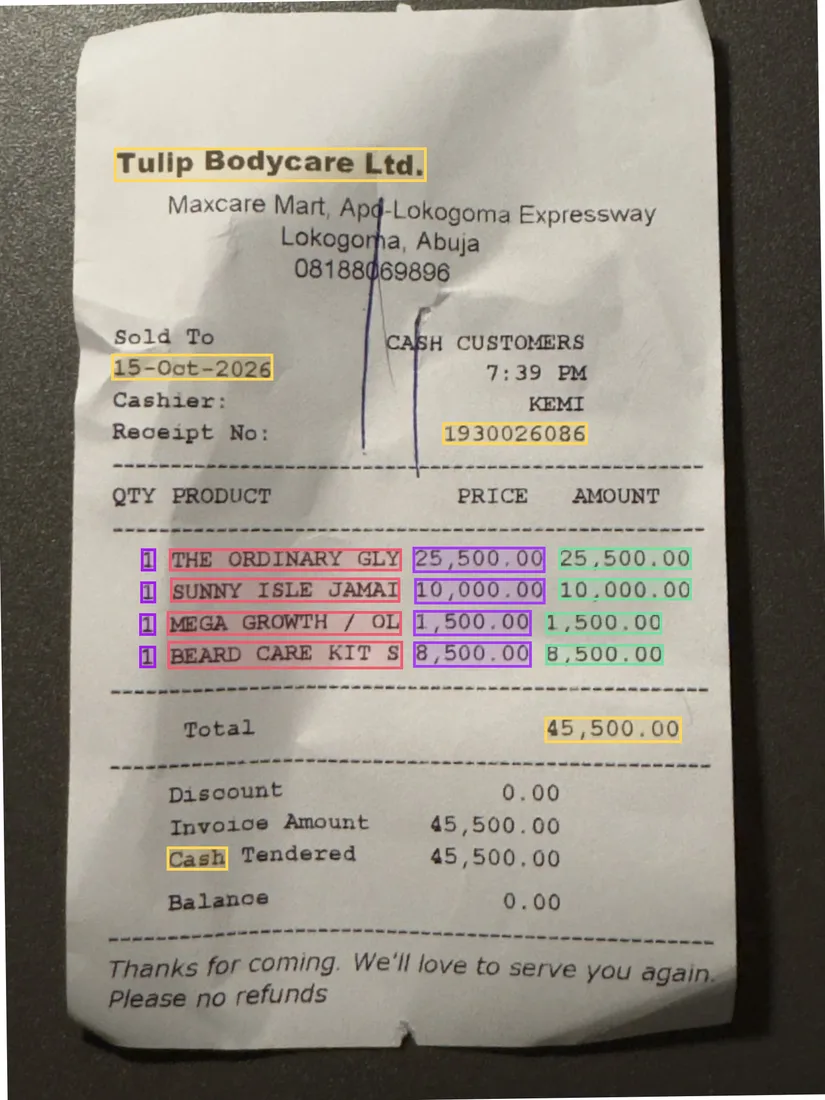
    A shop receipt photographed on a phone: Tulip Bodycare Ltd., 4 items, total ₦45,500.00, with a coloured box on every value Takarda read
    The photos as Takarda straightened them, with a box on every value it read.

How these were measured

The answer key

Built from each PDF's own text, with the position of every character, then checked against what the document says about itself: its transaction counts, totals, opening and closing balances and every running balance. Two people then compared the key with the page pictures and found no problem.

How Takarda was marked

Takarda's rows were matched to the key's rows by date, amount and balance. Every cell was compared by value: money to the kobo, dates by the day, descriptions word for word once spacing is ignored. Each box was compared with the key's position for the same cell.

Which version

These are the figures of the version tested. Changes made after the test (more boxes on statement rows, one check for each account, dates with a time, amounts without their minus sign, fewer wasted reads, descriptions across a page break) have not been measured again and are not counted here.

87 pages read in all.

Public receipts

Boxes on a public set of real receipt photos

Each card is one measured result from a public set of real receipt photos: the figure, what was counted, how many, and where the receipts come from. They test where Takarda puts the box for each value; they are not a score for every kind of document.

  • Words as annotated

    96.8%

    Box on the right words

    Boxes that sat on the words they point to. Counting only the boxes that closely match the words gives the same figure.

    Counted
    1,342 of 1,387 boxes; 95% interval 95.2% to 97.8%
    With 6% of the numbers misread
    95.8%, 1,289 of 1,346 boxes
  • Words as annotated

    73.0%

    Values given a place

    Values Takarda found a box for. The rest are marked Not on the page, never guessed.

    Counted
    1,387 of 1,900 values; 95% interval 69.8% to 76.0%
    With 6% of the numbers misread
    70.8%, 1,346 of 1,900 values
  • Words as annotated

    100%

    Missing totals reported as missing

    Receipts that print no total, where Takarda said Not on the page.

    Counted
    181 of 181 values; 95% interval 98.3% to 100%
  • Words as annotated

    2.7%

    Boxes on the wrong text

    Boxes that touched none of the words they should have marked. Lower is better.

    Counted
    38 of 1,387 boxes; 95% interval 1.8% to 4.2%
    With 6% of the numbers misread
    3.3%, 45 of 1,346 boxes

Source 200 public receipts with their annotated words. CORD v2, NAVER Clova, CC BY 4.0

How it works

Three steps. Then every file follows.

Set it up once. After that, each document is a drop and a download.

  1. Define

    Pick a ready field list or start your own. Say what to pull out in plain words, one sentence for each field.

  2. Upload

    Drop in PDFs, scans, phone photos, Word or text files. One at a time, or a whole folder at once.

  3. Download

    Check each file beside its page and confirm it. Then download Excel, CSV or JSON, one row for each file.

By hand or with Takarda

Stop typing it in again. Check it once instead.

The same pile of documents, two ways of getting it into your spreadsheet.

Typing it in by hand

Read the page, type the value, move to the next one.

  • ReadingYou read every value off the page and type it again.
  • CheckingA total that does not add up is easy to miss.
  • ProofNothing links a figure in the sheet back to its page.
  • ChangesA correction overwrites what was there before.
  • OutputEach new file means another stretch of typing.

With Takarda

Takarda reads the page. You check and confirm.

  • ReadingEvery value is read for you, with a box round it on the page.
  • CheckingMissing values, totals that do not add up and repeated files get a warning.
  • ProofClick a value and the page shows where it came from.
  • ChangesYour correction sits beside the first reading, with who made it.
  • OutputConfirm the file and download it as Excel, CSV or JSON.

Where the data goes

Confirmed rows, wherever you work.

Every confirmed file becomes rows you can open in a spreadsheet, load into your accounting software or fetch from your own system.

  • Excel

    One sheet, one row for each file, list fields on a sheet of their own.

  • CSV

    Opens in any spreadsheet and loads into most accounting software.

  • JSON

    Every value with its page and box, for your developers.

  • Accounting software

    Load the CSV through your software's own import.

  • The API

    Upload files and fetch rows from your own system with an API key.

Security

Your documents stay yours.

Documents carry names, prices and signatures. This is what happens to them.

  • Kept in Africa, read in Europe

    Stored in Africa (Johannesburg). Takarda AI reads each page in the European Union.

  • Never used for training

    Takarda does not use your documents to train any model.

  • Encrypted

    Files travel over an encrypted connection and are stored encrypted.

  • Every change logged

    Each correction and confirmation is logged with who made it. The original reading stays beside it.

Pricing

Pay for the pages you read. Not for the people who review.

A one-page document is one page. Reading again after you change a field list is free, and so are members and reviewers. Every plan has every field list and every download.

Free

₦0a month

Try the whole flow on your own documents.

Start free

Included

  • 30 pages read a month
  • No extra pages: upgrade to read more
  • Every field list, every download
  • Unlimited members and reviewers
  • Reading again after a field list change is free, 3 a day for each file

Starter

₦30,000a month

About $21

For a desk that reads documents every week.

Choose Starter

Included

  • 250 pages read a month
  • Extra pages ₦12,000 per 100
  • Every field list, every download
  • Unlimited members and reviewers
  • Reading again after a field list change is free, 3 a day for each file

Pro

₦100,000a month

About $71

For a team that reads documents every day.

Choose Pro

Included

  • 1,000 pages read a month
  • Extra pages ₦12,000 per 100
  • Every field list, every download
  • Unlimited members and reviewers
  • Reading again after a field list change is free, 3 a day for each file

Starter and Pro are paid by card or direct debit, month to month.

Business

Your field lists, product list and download files, set up for you.

From ₦350,000 a month About $248

From 4,000 pages, with extra pages quoted. Paid by bank transfer invoice.

Talk to us
  • Set up by us

    We build your field lists, load your product list and prices, and shape the download to fit your system.

  • Larger allowance

    From 4,000 pages a month, extra pages quoted.

Prices in naira, month to month, plus VAT of 7.5%. Dollar amounts are a guide.

Questions

Plain answers to plain questions.

Do I need to train anything?

No. You describe each field in a sentence and give a typical value. There are no models to train and no files to label. If a value comes back empty, reword the description and read the file again. Reading again after you change a field list is free, 3 times a day for each file.

Which files can I upload?

PDFs, JPG, PNG and HEIC pictures, Word (.docx) files and plain text (.txt) files. A file can have up to 100 pages and be up to 20 MB, and you can upload up to 50 files at once. A file Takarda cannot open is refused with a plain note on what to send instead.

What if a value is not on the page?

It reads Not on the page and stays empty. Takarda does not guess to fill a gap. A value that is found points to a box on the page. Some wrong readings can still get through, which is why you look at each file and confirm it before you download.

Can I check the results before I download?

Yes, and nothing downloads until you do. Open a file and see the document beside its values. Correct what is wrong, and Takarda keeps the original reading beside your change. Only files you have confirmed go into the download.

What can I download?

Excel, CSV or JSON, with one row for each confirmed file. A list such as invoice lines can be spread so every line gets its own row, or kept as one cell. A cell that starts with = or + cannot run as a formula. The purchase order field list also has a sales order download.

Where do my files go, and who can see them?

They are visible to the people you invite. Stored in Africa (Johannesburg). Takarda AI reads each page in the European Union. The Nigeria Data Protection Act treats both as transfers out of Nigeria, so we disclose them. Our privacy notice names the provider and explains how each is covered.

Does it understand Nigerian documents?

Yes. Naira amounts, VAT at 7.5%, Tax IDs and dates written day then month are read as printed, and phone photos are straightened before reading. The ready field lists are worded for Nigerian paperwork, and you can change any word.

What does it cost?

The Free plan reads 30 pages a month. Paid plans start at ₦30,000 a month for 250 pages, in naira, month to month. You pay for the pages Takarda reads, not for the people on your team.

More questions?

Ask us about your own documents.

Start reading your documents. The first 30 pages each month are free.

Make a field list, drop in a document and check every value beside its page.