Walkthrough
One receipt, start to finish.
A real shop receipt, photographed on a phone, goes in. Takarda reads it, a reviewer checks every value against the photo, and the files come out. This page is that one run, so you can check each step yourself.
- Values read29
- Confirmed29
- Corrected0
- Upload to ready29.9 s
Step 1
The photo that went in.
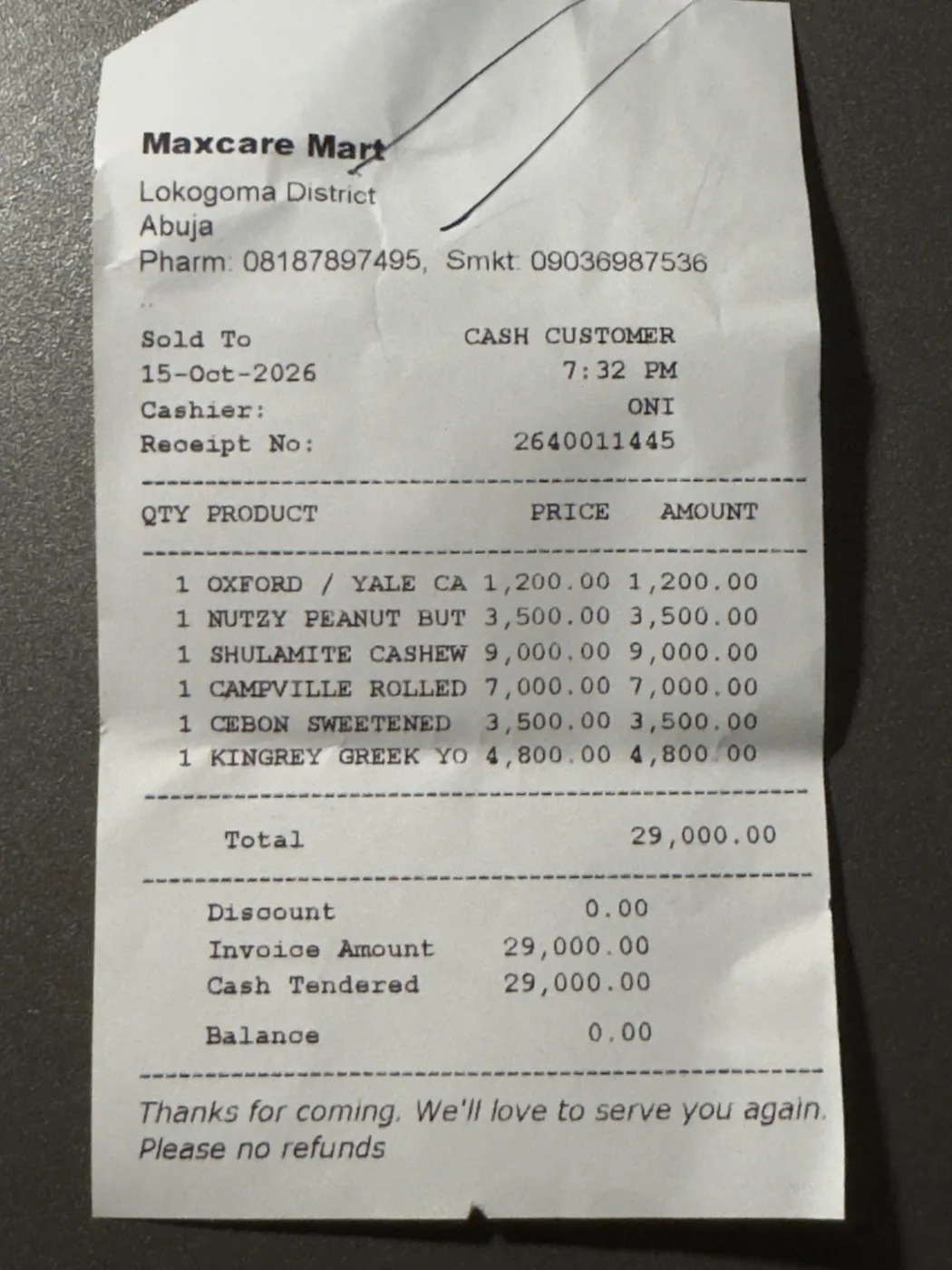
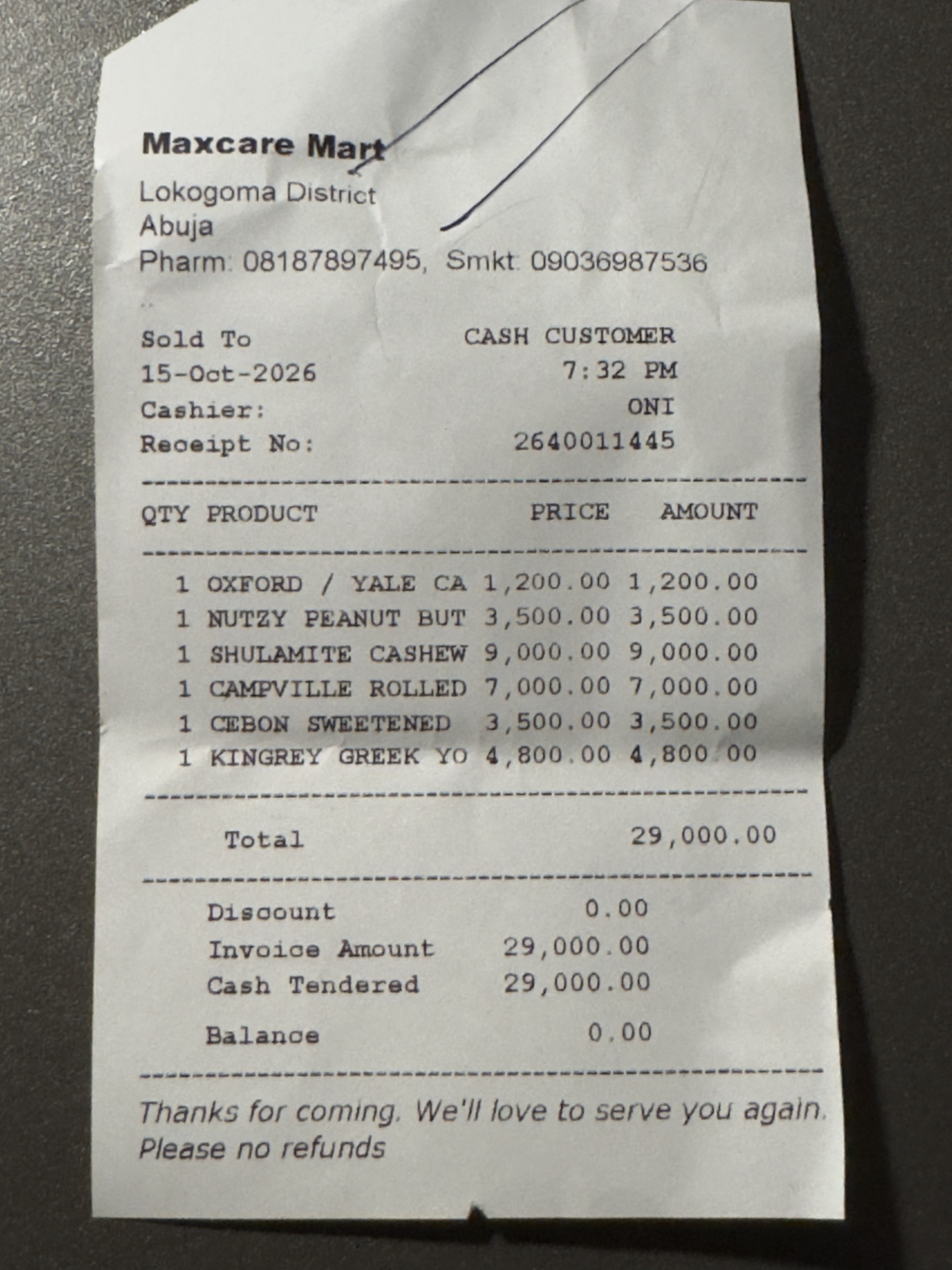
The receipt as it was uploaded: a phone photo of thermal paper, with a pen mark across the shop name.
- What it isA shop receipt, photographed on a phone
- FormatJPEG, 1.1 MB
- Pages1
This is the file that was uploaded, with its location data removed. The pen marks, the creases and the shadow are real. Nothing was cleaned up first.
Download the photoStep 2
The field list Takarda was given.
Takarda reads what you name. This is the ready receipt list, as the product holds it: a label, what each value asks for, and the columns of the items table.
- Shop nameTextNeeded
The name of the shop or business that issued the receipt.
Key
merchant_name - Shop Tax IDTextIf printed
The shop's Tax ID (TIN), if it is printed.
Key
merchant_tax_id - Receipt numberTextIf printed
The receipt, till or transaction number.
Key
receipt_number - DateDateNeeded
The date on the receipt.
Key
receipt_date - ItemsList of rowsIf printed
One entry for each row of things bought.
Key
items- DescriptionWhat was sold or done, as written on the row.
- QuantityHow many, as written on the row.
- Unit priceThe price of one, before VAT unless the row says otherwise.
- Line totalThe amount at the end of the row.
- SubtotalAmount in nairaIf printed
The total of the rows before VAT.
Key
subtotal - VATAmount in nairaIf printed
The VAT amount (7.5%).
Key
vat - TotalAmount in nairaNeeded
The total paid.
Key
total - How it was paidTextIf printed
Cash, card or transfer, if the receipt says.
Key
payment_method - CurrencyTextIf printed
The currency the amounts are in.
Key
currency
Step 3
What Takarda read from it.
Every value comes back with a status word. A box on the photo shows where it was found. Four values the receipt does not print stay empty and say Not on the page.
29 boxes, one for each value Takarda read. Hover or tap a row to light its box. Every value Takarda read from the receipt, with its status and whether it has a box Field Value read Status Receipt details Shop name Maxcare Mart CheckBox on page 1 Shop Tax ID Nothing read Not on the pageNo box Receipt number 2640011445 CheckBox on page 1 Date Printed on the receipt CheckBox on page 1 Subtotal Nothing read Not on the pageNo box VAT Nothing read Not on the pageNo box Total 29,000.00 CheckBox on page 1 How it was paid Cash CheckBox on page 1 Currency Nothing read Not on the pageNo box Item 1 Description OXFORD / YALE CA CheckBox on page 1 Quantity 1 CheckBox on page 1 Unit price 1,200.00 CheckBox on page 1 Line total 1,200.00 CheckBox on page 1 Item 2 Description NUTZY PEANUT BUT CheckBox on page 1 Quantity 1 CheckBox on page 1 Unit price 3,500.00 CheckBox on page 1 Line total 3,500.00 CheckBox on page 1 Item 3 Description SHULAMITE CASHEW CheckBox on page 1 Quantity 1 CheckBox on page 1 Unit price 9,000.00 CheckBox on page 1 Line total 9,000.00 CheckBox on page 1 Item 4 Description CAMPVILLE ROLLED CheckBox on page 1 Quantity 1 CheckBox on page 1 Unit price 7,000.00 CheckBox on page 1 Line total 7,000.00 CheckBox on page 1 Item 5 Description CEBON SWEETENED CheckBox on page 1 Quantity 1 CheckBox on page 1 Unit price 3,500.00 CheckBox on page 1 Line total 3,500.00 CheckBox on page 1 Item 6 Description KINGREY GREEK YO CheckBox on page 1 Quantity 1 CheckBox on page 1 Unit price 4,800.00 CheckBox on page 1 Line total 4,800.00 CheckBox on page 1 The receipt's date is printed on the photo and is in every download. This page does not repeat it.
Step 4
What the reviewer did with it.
The reviewer compared each value with the photo, kept the right ones and approved the file. Nothing downloads before that.
- 29Confirmed
The reviewer looked at each value on the photo and kept it as printed, with the reason “It matches the page”.
- 0Corrected
Every value read matched what is printed, so none needed changing. There is no before and after to show.
- 1Approved
Only after approval can the file be downloaded. Approving made one frozen version, and the downloads below come from it.
When read
- 29 Check
- 4 Not on the page
After the review
- 29 Confirmed
- 4 Not on the page
Shop Tax ID, Subtotal, VAT, Currency: the receipt prints none of them, so Takarda filled in nothing, and the reviewer agreed. These four stay Not on the page.
Checks Takarda raised
- NoteThe line Takarda AI read the merchant name from was not found on the page. The box is where the value itself appears.
- NoteThe table has no heading row that could be read, so its lines are placed from their own text.
- WarningRetake: the photo is cut off at the edge.
The warning stayed open. A warning never blocks approval; it asks for a look, and the look was at the photo itself.
Every value, before and after
Each value with what the reviewer did and its status afterwards Field Value after What the reviewer did Status after Shop name Maxcare Mart Confirmed: it matches the page Confirmed Shop Tax ID Nothing filled in Nothing to confirm Not on the page Receipt number 2640011445 Confirmed: it matches the page Confirmed Date Printed on the receipt Confirmed: it matches the page Confirmed Subtotal Nothing filled in Nothing to confirm Not on the page VAT Nothing filled in Nothing to confirm Not on the page Total 29,000.00 Confirmed: it matches the page Confirmed How it was paid Cash Confirmed: it matches the page Confirmed Currency Nothing filled in Nothing to confirm Not on the page Item 1, Description OXFORD / YALE CA Confirmed: it matches the page Confirmed Item 1, Quantity 1 Confirmed: it matches the page Confirmed Item 1, Unit price 1,200.00 Confirmed: it matches the page Confirmed Item 1, Line total 1,200.00 Confirmed: it matches the page Confirmed Item 2, Description NUTZY PEANUT BUT Confirmed: it matches the page Confirmed Item 2, Quantity 1 Confirmed: it matches the page Confirmed Item 2, Unit price 3,500.00 Confirmed: it matches the page Confirmed Item 2, Line total 3,500.00 Confirmed: it matches the page Confirmed Item 3, Description SHULAMITE CASHEW Confirmed: it matches the page Confirmed Item 3, Quantity 1 Confirmed: it matches the page Confirmed Item 3, Unit price 9,000.00 Confirmed: it matches the page Confirmed Item 3, Line total 9,000.00 Confirmed: it matches the page Confirmed Item 4, Description CAMPVILLE ROLLED Confirmed: it matches the page Confirmed Item 4, Quantity 1 Confirmed: it matches the page Confirmed Item 4, Unit price 7,000.00 Confirmed: it matches the page Confirmed Item 4, Line total 7,000.00 Confirmed: it matches the page Confirmed Item 5, Description CEBON SWEETENED Confirmed: it matches the page Confirmed Item 5, Quantity 1 Confirmed: it matches the page Confirmed Item 5, Unit price 3,500.00 Confirmed: it matches the page Confirmed Item 5, Line total 3,500.00 Confirmed: it matches the page Confirmed Item 6, Description KINGREY GREEK YO Confirmed: it matches the page Confirmed Item 6, Quantity 1 Confirmed: it matches the page Confirmed Item 6, Unit price 4,800.00 Confirmed: it matches the page Confirmed Item 6, Line total 4,800.00 Confirmed: it matches the page Confirmed The receipt's date is printed on the photo and is in every download. This page does not repeat it.
- 29Confirmed
Step 5
What came out, ready to download.
The approved receipt, in every form the download screen offers. Open them in Excel or any spreadsheet, or hand the JSON to other software.
CSV, one row for each item
File Shop name Shop Tax ID Receipt number Subtotal VAT Total How it was paid Currency Items: Description Items: Quantity Items: Unit price Items: Line total receipt-photo.jpg Maxcare Mart 2640011445 29000.00 Cash OXFORD / YALE CA 1 1200.00 1200.00 receipt-photo.jpg Maxcare Mart 2640011445 29000.00 Cash NUTZY PEANUT BUT 1 3500.00 3500.00 receipt-photo.jpg Maxcare Mart 2640011445 29000.00 Cash SHULAMITE CASHEW 1 9000.00 9000.00 receipt-photo.jpg Maxcare Mart 2640011445 29000.00 Cash CAMPVILLE ROLLED 1 7000.00 7000.00 receipt-photo.jpg Maxcare Mart 2640011445 29000.00 Cash CEBON SWEETENED 1 3500.00 3500.00 receipt-photo.jpg Maxcare Mart 2640011445 29000.00 Cash KINGREY GREEK YO 1 4800.00 4800.00 JSON, the first two items
{
  "merchant_name": "Maxcare Mart",
  "merchant_tax_id": null,
  "receipt_number": "2640011445",
  "items": [
    {
      "description": "OXFORD / YALE CA",
      "quantity": 1,
      "unit_price": 1200,
      "line_total": 1200
    },
    {
      "description": "NUTZY PEANUT BUT",
      "quantity": 1,
      "unit_price": 3500,
      "line_total": 3500
    }
  ],
  "subtotal": null,
  "vat": null,
  "total": 29000,
  "payment_method": "Cash",
  "currency": null
}
The other 4 items follow in the same shape.
The Date column and line are left out of these two previews. The receipt's date is printed on the photo and is in every download. This page does not repeat it.
- CSV, one row for the receiptreceipt.csv · 420 bytesDownload
- CSV, one row for each itemreceipt-one-row-per-item.csv · 807 bytesDownload
- Excel, one row for the receiptreceipt.xlsx · 5 KBDownload
- Excel, one row for each itemreceipt-one-row-per-item.xlsx · 6 KBDownload
- CSV, items spread over columnsreceipt-items-in-columns.csv · 850 bytesDownload
- JSONreceipt.json · 1 KBDownload
These are the files exactly as Takarda sent them. Nothing was edited and nothing was removed.
Step 6
The time and the cost.
The numbers for this one file, as Takarda recorded them.
- 29.9 sFrom upload to ready to review
- ₦17.49The cost of reading it, about $0.011
- 3Calls to Takarda AI: one to read, one to place the values, one to check them
- 33Values in the field list: 29 read, 4 not on the page
Naira are worked out at ₦1,600 to the dollar, from the cost Takarda recorded for this file. The time is measured from the start of the upload to the moment the file was ready to review. It does not include the time the reviewer spent looking at the photo. One receipt is one test: it says nothing about other receipts, which is why the full tests are on the case study.
Release
4bf6bdde52702135
Now try it on your own documents.
Name the fields you want, upload a file, and check every value against the page, just as the reviewer did.